 PCMate Free File Shredder
Outcome: the disposable copy has a reviewed overwrite-and-delete result, while the required final version remains outside the selection.
Before you begin
- Locate the final version and the unwanted draft before opening the shredder; do not infer which is final from the filename alone.
- Check whether another person or task still needs the draft before making a final disposal decision.
- Identify any independent cloud or backup versions so you can consider their retention separately.
1. Open the version that must stay
Use the normal document or media application to open the version you intend to keep. Check the content that distinguishes it as final: the relevant pages, edits or exported result. If you cannot establish that, postpone shredding.
Note the containing folder as well as the filename. A final file and a working draft may share a name under different folders, which makes a path check more useful than comparing only labels.
- Open and inspect the required retained copy.
- Write down or remember its complete location.
- Leave any unresolved version out of the disposal task.
Check before moving on: The retained version opens and contains the final material you need.
If the version decision is unresolved, leave the file out of the disposal task.
2. Add only the disposable ordinary file
Select the obsolete file in PCMate Free File Shredder and review the path shown in the queue. Compare that location with the retained version you just checked. The application acts on your selection rather than determining which document is newer or more valuable.
Keep this task focused on the known draft. Adding a whole set of unfamiliar working files makes the decision harder to verify and can mix material with different retention needs.
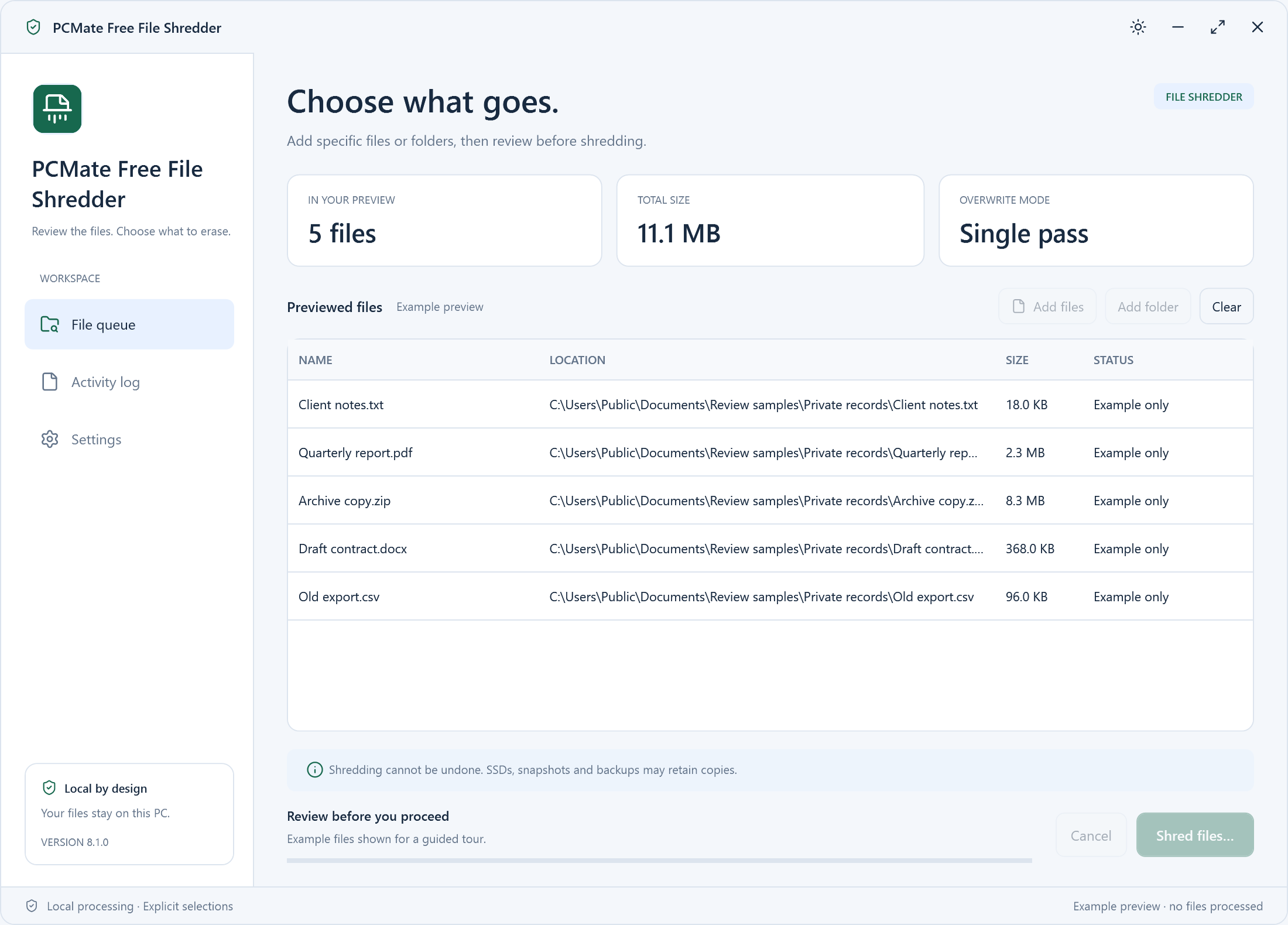
Find these controls in the real application
- Add files / Add folder
- Build the exact file queue. A selected folder contributes its ordinary files recursively; directory entries themselves remain.
- LOCATION / SIZE / STATUS
- Check the full selection before confirmation and read completed or skipped results afterwards.
- Shred files
- Reach an explicit permanent-operation confirmation, which defaults to No.
- Identify the exact disposable file and its folder.
- Compare the queue path against the version you are keeping.
- Remove uncertainty before reaching the confirmation step.
Check before moving on: The queue shows the exact disposable path, distinct from the retained version.
Preview again if the file changes after review; changed or locked items may be skipped.
3. Confirm overwrite and delete
Read the selected paths once more before confirming. The BleachBit file-overwrite engine overwrites and removes the selected ordinary files. This is a final disposal workflow, without a Recycle Bin copy or recovery-area undo supplied by the tool.
If you discover that a selected file needs another content check, pause the decision and inspect it outside this task. Confirm only when the reviewed selection matches the copies you have actually decided to discard.
- Keep the required final version outside the queue.
- Give confirmation only for the settled disposable selection.
- Do not use shredding as temporary storage for uncertain files.
Check before moving on: The explicit confirmation concerns only the settled disposable selection.
There is no Recycle Bin or recovery-area undo for files this task overwrites and deletes.
4. Check the result and the remaining versions
Read the reported outcome after the operation and investigate any selected file that did not complete. Check the relevant path and status before assuming the old draft is gone. Reopen the retained final version if you want a final check of the material you kept.
Independent backups and cloud versions are separate copies. Decide whether to keep or remove them through their own storage tools. A local overwrite result also does not guarantee that all historical copies on an SSD have been erased.
- Check completion for the selected disposable file.
- Investigate any unsuccessful item before retrying.
- Review separate stored versions according to their purpose.
Check before moving on: The local completion status is understood and the required final copy remains usable.
A local result does not erase independent backup, cloud or snapshot copies, or guarantee historical SSD data removal.
Check your result
- The engine overwrites and removes accepted ordinary files one at a time. No Recycle Bin copy or recovery-area undo is created by this task.
- Locked files and files whose size or modification time changed after preview are skipped. Review and preview again before retrying.
- Cancel stops future work, but completed actions remain and an active overwrite may leave its file partially changed.
This file operation does not wipe a drive or free space, follow linked paths, process hard links or erase independent backups, cloud copies and filesystem snapshots. SSD wear levelling and remapping prevent a promise that every historical copy is gone.
The two files have the same name. Which should I choose?
Do not choose by name alone. Compare their full locations and open the version you intend to retain. Add the disposable path only after you have verified the required copy.
Is this suitable for erasing an entire old computer?
No. This task concerns selected ordinary files, not whole-drive erasure or free-space wiping. Use an appropriate device-level process for retiring an entire storage device.
What if the draft changes after I preview it?
Files whose size or modification time changed after preview are skipped. Reopen the relevant document, settle whether it is disposable, then preview the exact path again before any new confirmation.